Scalar Triple Product Calculator

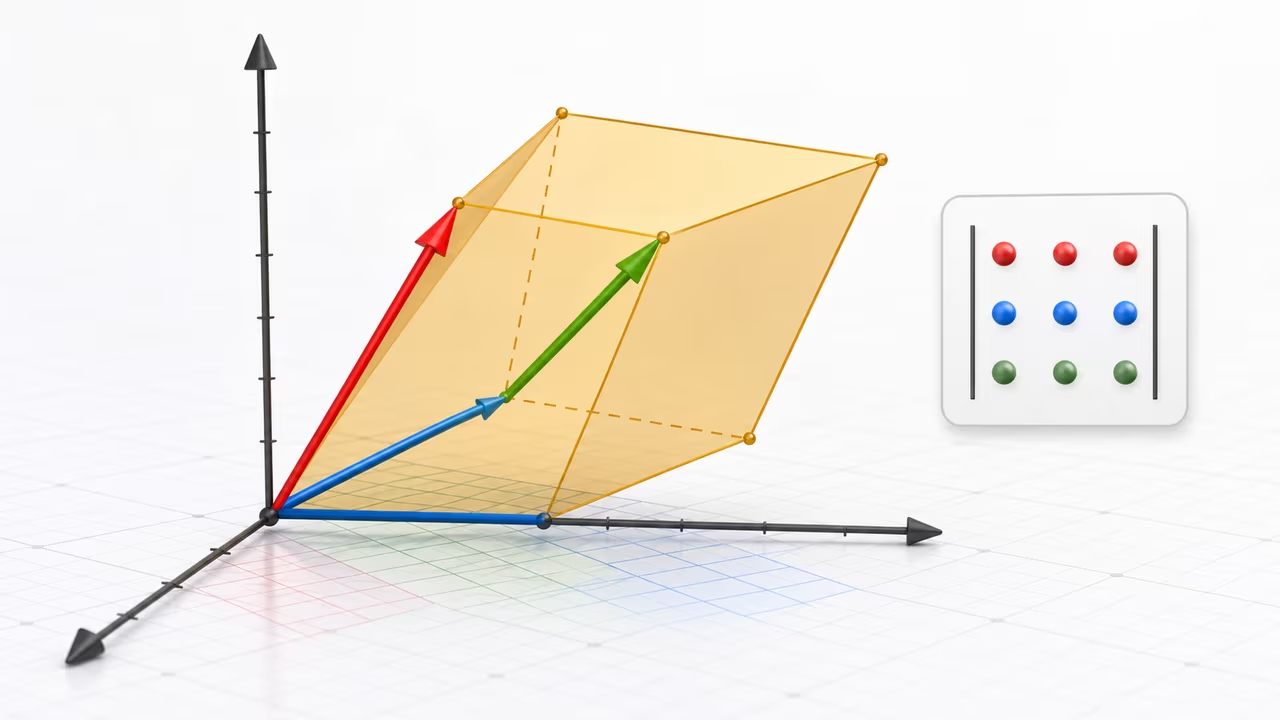
Scalar triple product and parallelepiped volume
This scalar triple product calculator evaluates A · (B × C) for three 3D vectors and turns the determinant into a geometric answer you can use. The signed value is the oriented volume of the parallelepiped spanned by the three vectors, while the magnitude is the actual volume.
That makes the calculator useful when you want to check whether three vectors truly fill 3D space, whether a basis has flipped orientation, or whether the data has collapsed into a plane. It also reports the intermediate cross product, base area, and height so you can see how the volume is assembled instead of treating the result as a mystery number.
How to use the scalar triple product calculator
- Enter vector A, vector B, and vector C as three components each. Commas, spaces, parentheses, and brackets are accepted, so
1,2,3,(1, 2, 3), and1 2 3all parse the same way. - Leave the near-coplanar tolerance at its default for ordinary decimal inputs. Raise it only when you want extremely small scalar triple products treated as effectively zero.
- Press Compute Scalar Triple Product to calculate the signed value, absolute volume, orientation, cross product, base area, and height.
- Use the copy button when you want to paste the calculation into class notes, a geometry check, a physics derivation, or a 3D workflow.
Scalar triple product formula and determinant form
For three vectors in 3D, the calculator uses the standard scalar triple product definition:
their scalar triple product is defined as
Formula: a → · (b → × c →).
This is a single real number. It is called “scalar” because the result is a scalar, not a vector, and “triple product” because it combines three vectors through a cross product and a dot product.
Geometric meaning: from vectors to volume
The scalar triple product calculator translates A · (B × C) into base area, height, and signed volume.
- The cross product is a vector perpendicular to the plane spanned by and . Its magnitude equals the area of the parallelogram built on and .
- The dot product projects onto this perpendicular direction. The magnitude of that projection is the height of the parallelepiped formed by .
Combining these observations:
- Base area =
- Height = the component of along
- Volume = base area × height =
The sign of the scalar triple product tells you orientation:
- If follow the right-hand rule, the scalar triple product is positive.
- If they follow a left-handed orientation, the scalar triple product is negative.
- If the scalar triple product is zero, the three vectors are coplanar (they lie in the same plane), and the “parallelepiped” has zero volume.
Determinant formula
The scalar triple product can also be written as a 3×3 determinant, which is the form many textbooks and linear-algebra routines use.
Formula: a → ·(b → × c →) = det a_1 a_2 a_3 b_1 b_2 b_3 c_1 c_2 c_3.
In expanding this determinant, you obtain an explicit formula in terms of the components:
Formula: a → ·(b → × c →) = a_1(b_2 c_3 − b_3 c_2) − a_2(b_1 c_3 − b_3 c_1) + a_3(b_1 c_2 − b_2 c_1)
This expansion shows several key properties:
- The result is linear in each vector: doubling doubles the scalar triple product, and similarly for and .
- Swapping any two rows (i.e., swapping any two vectors) changes the sign of the determinant and therefore the sign of the scalar triple product.
- If the rows are linearly dependent (one row is a linear combination of the others), the determinant is zero. This corresponds to the vectors being coplanar in geometry.
MathML representation of the scalar triple product determinant
Some browsers and assistive tools read the determinant form more cleanly when it is encoded in MathML. This block shows the scalar triple product as the signed-volume determinant used by the calculator:
Here V denotes the scalar triple product value, which equals the signed volume of the parallelepiped formed by .
How this scalar triple product calculator works (conceptual steps)
Behind the scenes, this scalar triple product calculator follows these steps:
- Parse inputs. Each vector field is split into three components. The tool expects exactly three numeric values for each vector, whether they are separated by commas or spaces.
- Convert to numbers. The components are converted to real numbers. Negative values and decimals are allowed as long as they follow standard numeric notation.
- Form the determinant. With , , and in hand, the algorithm computes the determinant using the expanded formula above.
- Compute the scalar triple product. The determinant value is the scalar triple product .
- Compute the volume. The volume of the parallelepiped is the absolute value of this result, .
- Check special cases. If the value is exactly zero (or extremely close to zero within numerical tolerance), the vectors are treated as coplanar and the volume as zero.
The implementation details may vary, but conceptually the determinant formula provides a direct and efficient way to obtain the scalar triple product from the vector components.
How to interpret scalar triple product results
After you run the calculator, the output separates the signed scalar triple product from the geometric quantities that come with it:
- Scalar triple product: This is the raw value of . It may be positive, negative, or zero.
- Volume: The calculator reports the volume as the absolute value of the scalar triple product, , which is always non-negative.
- Orientation or coplanarity message (if provided): Based on the sign or the magnitude of the result, the tool may indicate whether the vectors are right-handed, left-handed, or coplanar.
In practical terms:
- If , the triple is right-handed, and the volume is in magnitude.
- If , the triple is left-handed, and the volume is in magnitude.
- If , the vectors are coplanar and do not span a 3D volume; the parallelepiped collapses to a flat shape.
Worked example: axis-aligned vectors with easy volume
To see the scalar triple product calculator at work, try three axis-aligned vectors:
These vectors line up with the coordinate axes, so the geometry is easy to read: points along the x-axis, and measures the height directly.
- Compute the cross product .
- Dot with .
- Interpretation.
The scalar triple product is 6, so the parallelepiped volume is cubic units. The positive sign confirms the orientation is right-handed.
If you enter these vectors into the calculator as
1,0,00,2,00,0,3
you should obtain a scalar triple product of 6 and a volume of 6.
Comparison with dot and cross products
When you're using the scalar triple product calculator, it helps to keep its relationship to the dot product and cross product in view. The table below highlights the differences and connections.
| Operation | Inputs | Output type | Main geometric meaning | Typical use |
|---|---|---|---|---|
| Dot product | 2 vectors | Scalar | Measures how aligned two vectors are; related to the cosine of the angle between them. | Checking orthogonality, projecting one vector onto another, work in physics. |
| Cross product | 2 vectors (in 3D) | Vector | Perpendicular to both inputs; magnitude equals area of the parallelogram formed by the vectors. | Finding normal vectors, torque, rotational effects, 3D graphics. |
| Scalar triple product | 3 vectors (in 3D) | Scalar | Signed volume of the parallelepiped spanned by the three vectors. | Computing volumes, checking coplanarity, determining orientation in 3D. |
Practical uses of the scalar triple product
The scalar triple product appears whenever a 3D problem needs a signed volume or an orientation test:
- Geometry and analytic geometry: Quickly compute the volume of a parallelepiped or determine whether three vectors in space are coplanar.
- Physics: Evaluate quantities involving torque and moment arms, or compute oriented volumes when analyzing fluxes or triple integrals with Jacobians.
- Computer graphics and 3D modeling: Determine the orientation of triangles and faces, detect back-facing polygons, and check whether sets of edges form degenerate (flat) shapes.
- Engineering and robotics: Analyze the configuration of arms or supports in 3D, assess whether structures span full 3D space, and detect singular configurations where motion becomes constrained.
In many of these contexts, an automated calculator helps avoid sign errors and arithmetic mistakes, especially when working under time pressure or with non-integer coordinates.
Assumptions and limitations of this scalar triple product calculator
For dependable scalar triple product results, keep these assumptions in mind:
- Dimension: The calculator is designed for 3D vectors only. Each input vector must have exactly three components.
- Input format: Enter components as comma-separated numbers, for example
1,2,3or-0.5, 2.75, 4. Extra commas or missing components will typically produce an error or invalid result. - Numeric types: Real numbers (including decimals and negatives) are allowed. Very large or very small magnitudes may be affected by standard floating-point rounding and precision limits.
- Units: The calculator does not track units. If your vector components carry units (for example, meters), the resulting volume will inherit the corresponding cubic units (for example, cubic meters), but this interpretation is up to you.
- Exact coplanarity: For theoretical work, vectors are coplanar when the scalar triple product is exactly zero. With floating-point arithmetic, you may see very small nonzero values (like
1e-15) instead of perfect zero. - Error handling: Non-numeric entries, incomplete vectors, or formatting errors may prevent the calculator from producing a meaningful result. Always double-check your input if the output seems unexpected.
Tips for getting reliable scalar triple product results
A few small habits make scalar triple product calculations more reliable:
- Double-check that each vector has three components before pressing the compute button.
- If you are using the result in a physical context, remember to assign and track your own units.
- For nearly coplanar vectors, expect small numerical noise; treat sufficiently tiny results as effectively zero, depending on your tolerance.
- When comparing orientations, pay attention to the sign of the scalar triple product, not just its magnitude.
Related vector and determinant concepts
If you are studying the scalar triple product, the surrounding topics worth reviewing are dot products, cross products, vector norms, and matrix determinants, because they all meet in the geometry of Euclidean 3-space.
Volume Vector Sprint
This mini-game mirrors the scalar triple product by rewarding taller, non-coplanar configurations. Steer the green vector tip away from the flat coplanar band to collect volume cubes. The signed volume changes as the vector crosses the base plane, so the same action that makes the game safer also mirrors the calculator's orientation result.
Drag or use the arrow keys to move the green vector. Collect amber volume cubes and avoid red coplanar slabs.