
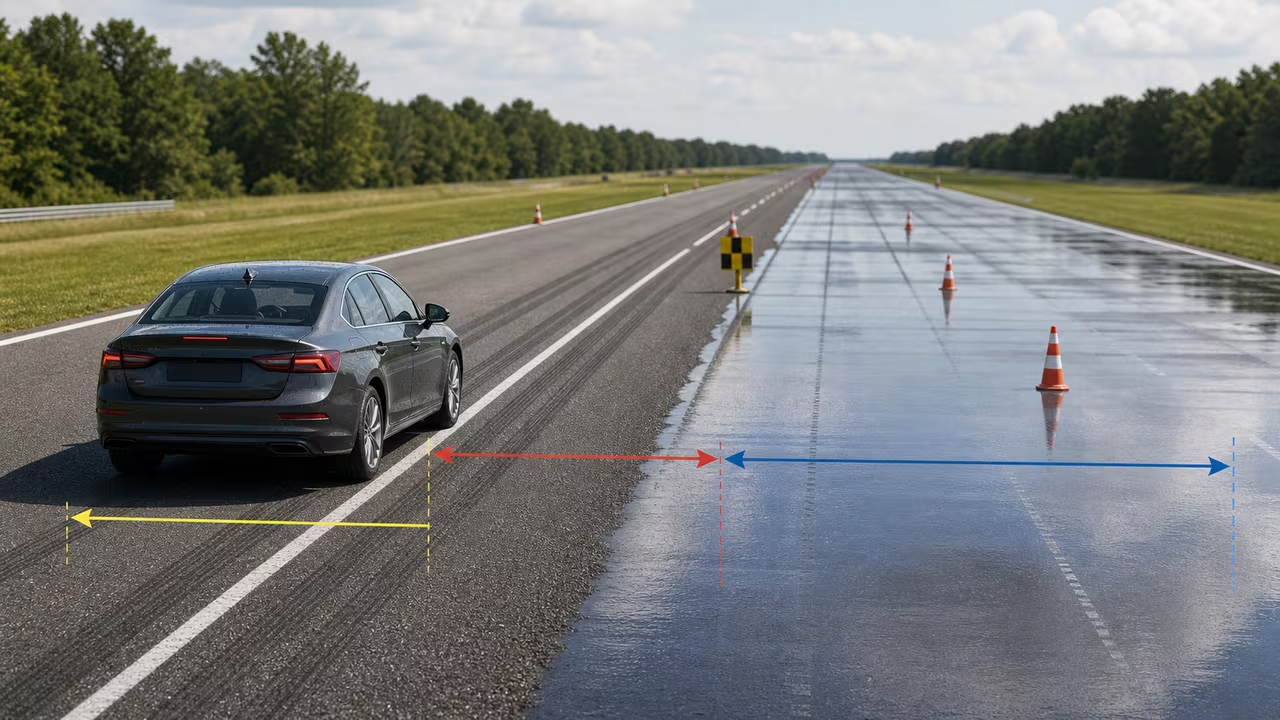
Reaction distance and braking distance, added together
When you spot a hazard, the car keeps rolling before anything slows it down. That first stretch — while your brain registers the problem and your foot reaches the pedal — is reaction distance. Only once the brakes bite does the car start shedding speed against tire grip, and that second stretch is braking distance. Add the two and you have the road you actually need to come to a stop. Everything here is metric: speed in km/h, reaction time in seconds, grip as a friction coefficient (μ), and distances in metres.
Three inputs drive the answer. Speed is how fast you are going the moment the hazard appears. Reaction time is how long you spend perceiving and responding — roughly 1.0–1.5 s when you are alert and half-expecting to brake, and noticeably longer when you are tired, distracted, or genuinely surprised. Friction μ is the usable grip between tire and road: about 0.7–0.8 on dry asphalt, 0.4–0.6 when it is wet, 0.2–0.3 on packed snow, and as little as 0.1 on ice. Results refresh as you type, so it is easy to pin two values and sweep the third — say, hold 90 km/h steady and watch the total swing as μ falls from 0.75 to 0.35.
The formula, and why a little more speed costs so much road
The model treats the road as level and the deceleration as steady. First convert speed to metres per second with v = speed ÷ 3.6, then split the stop into its two parts. Reaction distance is simply speed multiplied by time, d_reaction = v × t, which grows in a straight line. Braking distance comes from the car's kinetic energy divided by the braking force it can generate:
with g ≈ 9.81 m/s², and the total is D = d_reaction + d_brake. The decisive detail is that v² on top: braking distance climbs with the square of speed, so going from 80 to 100 km/h — only 25% faster — stretches the braking portion by more than half. Grip sits in the denominator, so cutting μ in half roughly doubles the braking distance at the same speed. That single number, μ, is not a fixed property of the road; it shifts with tire compound, tread depth, temperature, and how much water sits on the surface.
Put numbers to it: at 90 km/h on dry asphalt (μ = 0.70) with a 1.5 s reaction, v = 25 m/s. Reaction distance is 25 × 1.5 = 37.5 m, braking distance is 25² ÷ (2 × 0.70 × 9.81) ≈ 45.5 m, and the total lands near 83 m. Now drop μ to 0.40 for a wet road: the braking part alone jumps to about 80 m even though your reaction time never moved. That gap — same speed, worse grip — is why a familiar car can feel like a completely different machine in the rain.
Surface and speed compared side by side
The table below runs the same formula across four surfaces and three speeds, all with a 1.5 s reaction time and g = 9.81 m/s². Read across a row to see how the square law punishes speed, and read down a column to see how the 1 ÷ μ term punishes lost grip. The two effects multiply: the ice row at 110 km/h needs roughly thirteen times the road of the dry row at 50 km/h.
| Surface (typical μ) | 50 km/h | 80 km/h | 110 km/h |
|---|---|---|---|
| Dry asphalt (μ 0.75) | 34 m | 67 m | 109 m |
| Wet asphalt (μ 0.50) | 40 m | 84 m | 141 m |
| Packed snow (μ 0.25) | 60 m | 134 m | 236 m |
| Ice (μ 0.12) | 103 m | 243 m | 442 m |
Grade, and the following distance that falls out of the same formula
A slope tilts the energy balance. Writing the grade as a decimal G (a 6% downgrade is G = −0.06), the usable deceleration becomes a = g × (μ + G) and the braking term turns into:
On dry asphalt a 6% downgrade shaves grip from 0.75 to an effective 0.69 — noticeable but survivable. On ice at μ = 0.12 the same downgrade halves the effective figure to 0.06 and doubles the braking distance, which is why mountain passes post low winter limits long before the road looks dangerous. Uphill works the other way and quietly buys back road.
The same algebra answers the following-distance question. If the car ahead brakes at roughly the deceleration you can reach, both of you shed speed at the same rate, the v² ÷ (2a) terms cancel, and the gap you need collapses to your reaction distance alone — v × t. At 100 km/h with a 1.5 s reaction that is about 42 m, or roughly the two-second rule. The moment the assumption breaks, the margin has to grow: a lighter car ahead on better tires may stop shorter than you can, and the difference in braking distances is added straight onto the reaction term. Wet leaves, a patch of black ice under one car and not the other, or a loaded trailer behind you all widen that difference, and none of them announce themselves in advance.
Assumptions and limitations of this model
The estimate is deliberately clean, and the assumptions behind that cleanliness leave out several things that matter once you are actually on the road. These are the limitations to keep in mind:
- No grade in the main result. The calculator above treats the road as flat; use the grade-corrected formula in the previous section when a slope matters.
- Constant grip. μ is one value for the whole stop, but real grip changes with standing water, ice patches, tire wear, and temperature.
- Instant, maximum braking. Real brakes take one to three tenths of a second to build full pressure, and a driver rarely reaches the grip ceiling on the first application.
- No brake fade. Long or repeated braking heats the brakes and quietly reduces their bite.
- Tire and ABS nuances ignored. Load transfer, tire compound, and how ABS modulates pressure all shift the deceleration you can really reach.
- Not for legal or engineering use. Accident reconstruction and vehicle certification need measured data and professional methods, not a teaching estimate.
Read the output as a floor for building intuition, not a guarantee, and leave yourself margin. A good exercise is to pick a speed you drive often and compute it three ways — dry (μ ≈ 0.75), wet (μ ≈ 0.50), and icy (μ ≈ 0.15) — first with a 1.0 s reaction and then with 2.0 s. Seeing the totals side by side makes the case for slowing down in bad conditions far better than any rule of thumb. The NHTSA speeding page makes the same point from the safety side: speed drives both stopping ability and crash severity. If you think in mph, multiply by 1.609 to reach km/h (50 mph ≈ 80 km/h, 70 mph ≈ 113 km/h).
Questions drivers actually ask
Why does braking distance grow faster than my speed does?
Because it depends on v². Reaction distance rises in step with speed, but braking distance rises with speed squared, so a 20% bump in speed can add far more than 20% to the road you need. That is the single biggest reason small speed reductions pay off so well on the highway.
How much do wet or icy roads really change things?
A lot, because braking distance is inversely proportional to μ. Halving grip — dry asphalt at 0.7 down to a wet 0.35 — roughly doubles the braking portion for the same speed. Ice, near μ = 0.1, can multiply it several times over, which is why the calculator's total can look alarming at winter grip levels.
How much following distance do I actually need?
When the car ahead can brake about as hard as you can, the two braking distances cancel and what is left is your reaction distance, v × t. That is the arithmetic behind the two-second rule, and it is why the gap has to stretch when you are tired, when your tires are worse than theirs, or when grip is patchy enough that one of you finds traction the other does not.
Can I use these results for legal or engineering work?
No. This is a learning and comparison tool built on a simplified level-road model. Accident reconstruction, compliance testing, and vehicle design all require measured data and established professional methods.
Does ABS shorten my stopping distance?
Mainly it keeps you steering while braking hard and helps many drivers reach near-maximum braking on mixed surfaces. It does not manufacture grip — the deceleration ceiling is still set by tire-road friction, exactly the μ you enter above.
Copy feedback will appear here after you copy a result.
Grip Line: a stopping-distance dispatch run
Run five delivery routes under one rule: the clear road ahead of you must always be longer than your reaction distance plus your braking distance. Surfaces change from dry asphalt to black ice, the grade tips for and against you, fog and blind curves cut how far you can see, and a lead van brakes for things you cannot see yet. Beat the clock without an incident.
Grip Line
Five routes, worsening grip and shrinking sight lines. Keep your projected stop inside the clear road ahead, and finish before the clock runs out.
Press start, then steer your speed with the pads or the keyboard.
How to play
- Goal: reach the end of each route before the clock hits zero with fewer than three incidents. Five routes, each with worse grip, steeper grades and shorter sight lines than the last.
- The rule: the amber bar is reaction distance
v × tand grows in a straight line with speed; the red bar is braking distancev² ÷ (2a)and grows with the square of speed. Their sum is projected onto the road ahead of your car. Keep it shorter than the white "clear road" marker — whichever is nearer of your sight line, the gap to the lead van, or a revealed hazard. - Keyboard: ↑ or W to accelerate, ↓ or S to brake, hold Space to cover the brake (halves your reaction time while your focus lasts), Enter to start or restart, P to pause, R to reset. Click the road once so it has keyboard focus.
- Pointer and touch: hold the SLOW, ALERT and FASTER pads along the bottom of the scene. Tapping anywhere else on the road covers the brake for a moment, and starts or restarts the run when the route is not in progress.
- Braking is not instant: pressing slow only arms the brakes; they bite one reaction time later, and that lag is drawn as the amber band. Covering the brake shortens it, but focus drains while you do and recovers when you release.
- Scoring: points for distance covered, for stopping close to a hazard rather than a hundred metres short, for clearing speed-limit zones, and for time left on the clock. Incidents cost points and time; three end the run.
- Calculator link: "Use my calculator values" seeds the driver's reaction time from your reaction input, scales every route surface against your μ, and caps cruise speed at the speed you entered.